
Claude for K-12 Teachers
The Only Guide You Need to Context Steering, Projects, Skills and Free Educator Access developed from over 10,000 prompts with Claude

Anthropic has launched Claude for Teachers, with free access available to verified educators who register for the current offer.
Useful, obviously.
Yet, all I could think of was thousands of K-12 teachers opening Claude, typing “make me a lesson plan about ecosystems”, receiving something clean and sensible, then assuming the tool is epic. Yes you can add the skills they give you, but why wouldn’t you write your own, or at least know how to remix/adapt them?
Claude becomes more useful when it knows your context, when that context has somewhere organised to live, and when you have worked out a repeatable process for the jobs you do regularly.
This guide covers a fairly simple setup that I use:
Put your teaching context into a file called
steering.md.Add the file to a Claude Project.
Create smaller files for specialist instructions, such as
grammar-req.md/class-neuro-adaptions.mdDevelop a teaching process in an ordinary Claude conversation.
Test the process on standards or lessons that you do.
Turn it into a Claude Skill when it is giving high quality outputs that don’t need a lot of iteration.
The example I will use is a process-based student portfolio. The portfolio collects evidence while students complete an assignment instead of judging everything from the final polished product.
You do not need to be technical for any of this.
You do need to take the time to work out what you want Claude to understand, what you want it to do and where it should stop.
Please consider joining a yearly membership! I make it super cheap at $50usd for everyone, I already have over 100 incredible workflows, and each sign up allows me to dedicate time for another workflow!
If you pay and you don’t like the content, I will happily refund you!
Start With Context, Not a Giant Prompt
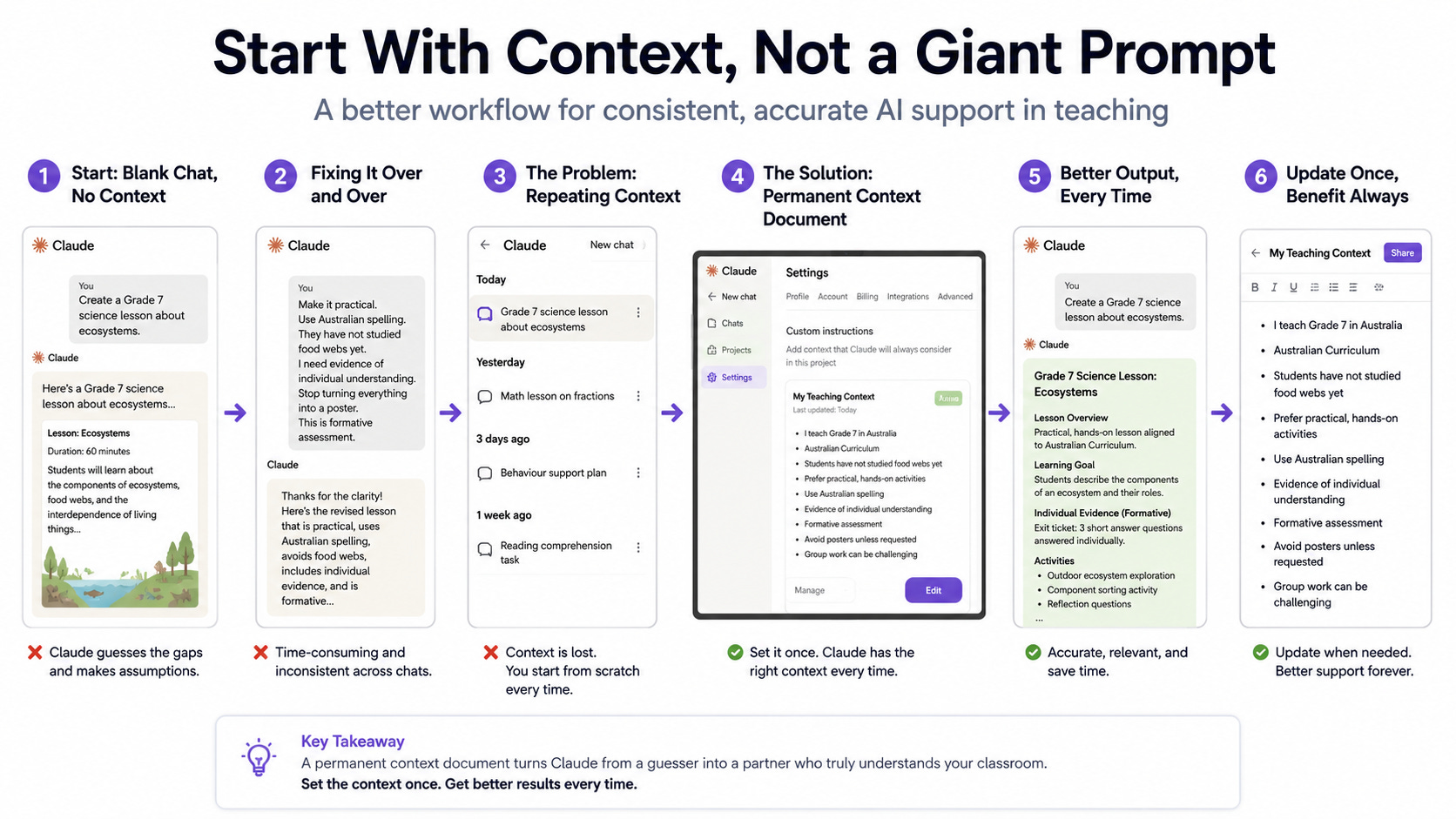
Teachers carry a lot of incredible and varied information in their heads.
They know the curriculum. They know which students need instructions split into smaller pieces. They know the class has not learned food webs yet. They know a group presentation will cause three students to do the work while everyone else selects fonts.
Claude knows none of that when you open a new conversation.
You type:
Create a Grade 7 science lesson about ecosystems.
Claude fills the gaps.
It guesses the lesson length, curriculum, reading level, available technology, assessment method and what students already know. The guesses are usually plausible. That is part of the problem because a plausible mistake can sit inside an otherwise decent lesson without looking obviously wrong.
You then begin correcting it:
Make it practical.
Use Australian spelling.
They have not studied food webs yet.
I need evidence of individual understanding.
Stop turning everything into a poster (What’s the deal with asking for PBL and posters?).
This is formative assessment.
A few days later, you start another chat and explain the same things again.
The first improvement is not a cleverer prompt.
Enter the permanent context document.
Step 1: Make a steering.md file - the ‘Context’ file - Get Claude to Interview You
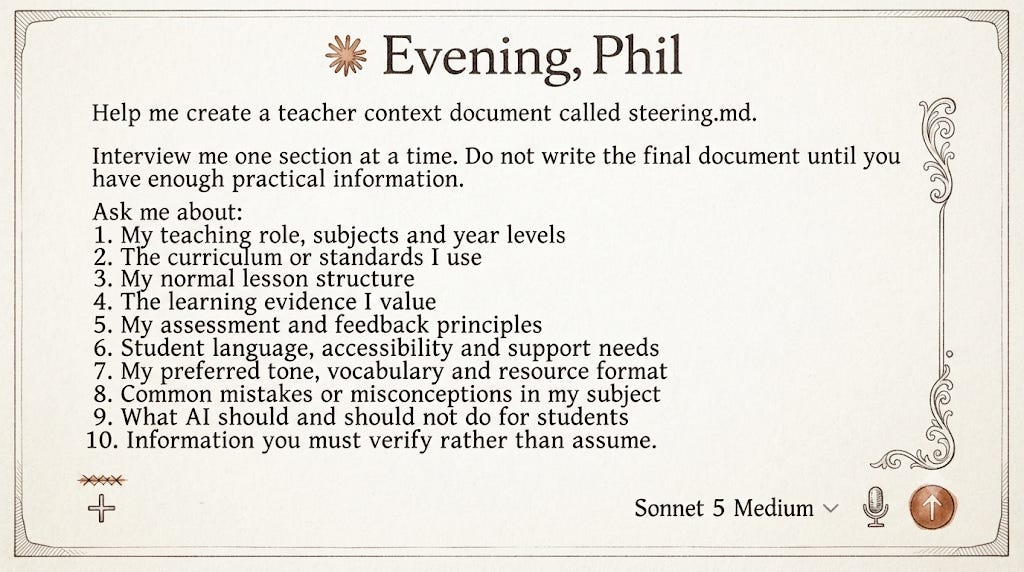
Writing a useful context file from scratch is surprisingly hard. Most people either write vague principles or include far too much.
Let Claude interview you instead.
Open a normal Claude conversation and paste this:
Help me create a teacher context document called steering.md.

Interview me one section at a time. Do not write the final document until you have enough practical information.

Ask me about:

1. My teaching role, subjects and year levels
2. The curriculum or standards I use
3. My normal lesson structure
4. The learning evidence I value
5. My assessment and feedback principles
6. Student language, accessibility and support needs
7. My preferred tone, vocabulary and resource format
8. Common mistakes or misconceptions in my subject
9. What AI should and should not do for students
10. Information you must verify rather than assume

Ask practical follow-up questions when my answers are vague.

After the interview, create a concise Markdown document with clear headings, direct instructions and a final section called “Ask Before Assuming.”
Take your time, answer the questions really, like really well, like you are explaining it to a teacher that has to take over your class.
Claude may ask what you teach and you might answer:
Grade 7 science.
Fine, but it still does not know much.
A better interview would work out:
which curriculum you use;
whether lessons last 45 or 90 minutes;
the hopeful lesson sequences;
what students have already covered;
typical reading levels;
whether practical investigations are possible;
how students record evidence;
what makes a scientific explanation strong in your class;
which misconceptions appear repeatedly;
how students are allowed to use AI;
when sources need checking.
Don’t overload it and just ask AI to write it. Give it the information that alters its decisions.
Step 2: Put the Context (Steering.md) Inside a Claude Project
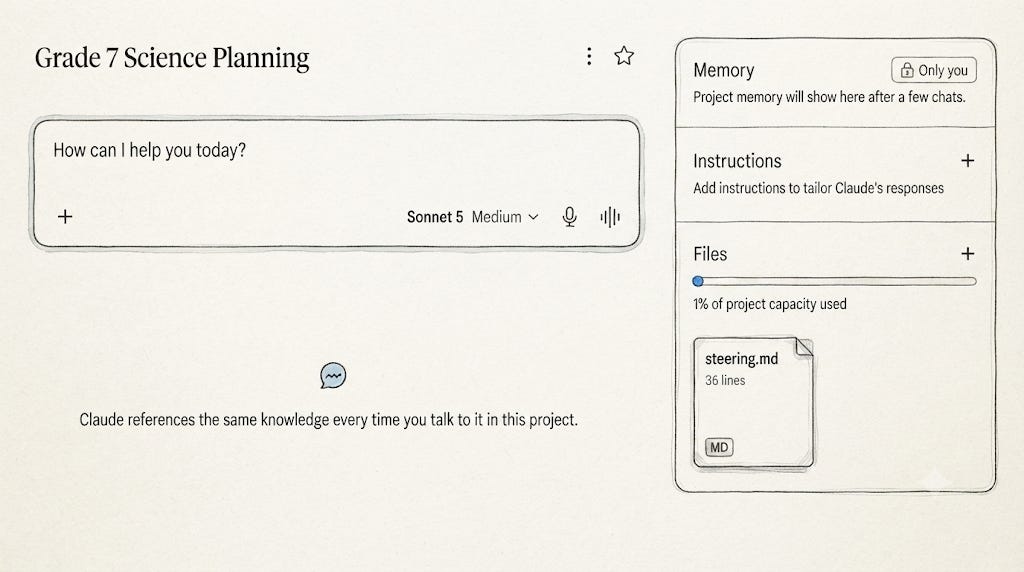
Once the file is ready, create a Claude Project.
A Project is a workspace for related conversations, instructions and uploaded reference material.
You could make one for:
Grade 7 Science Planning
Year 5 Literacy
English Feedback and Assessment
Curriculum Review
Staff Professional Learning
Project-Based Learning Design
Student AI Fluency Missions
Do not make one Project called Teaching and dump everything into it.
That becomes the digital version of a cupboard where the batteries, glitter, old rubrics and broken whiteboard markers all live together.
For this example, create:
Grade 7 Science Planning
Upload:
steering.md;
Give the Project Instructions
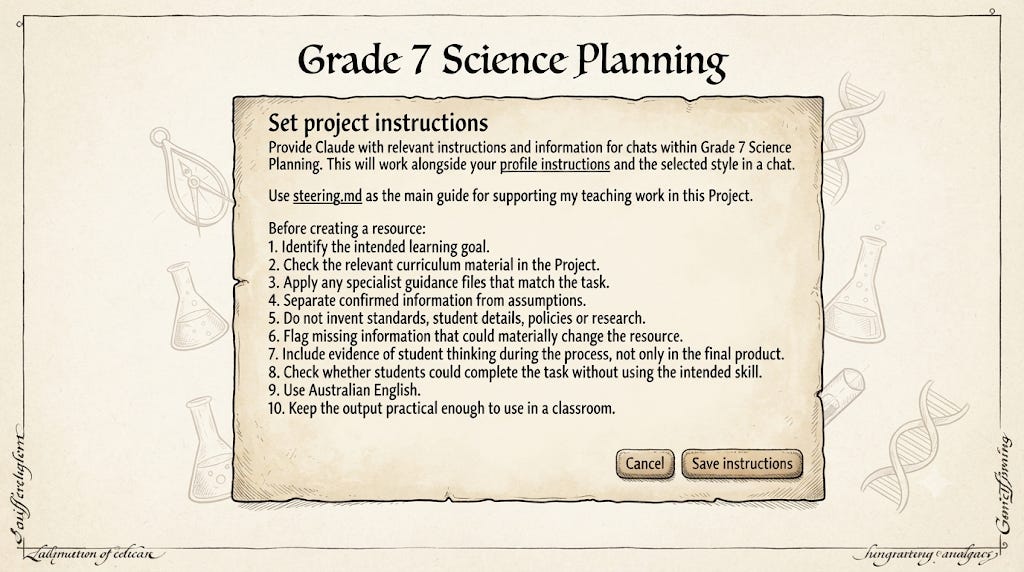
The Project instructions tell Claude how to use the files.
Try:
Use steering.md as the main guide for supporting my teaching work in this Project.

Before creating a resource:

1. Identify the intended learning goal.
2. Check the relevant curriculum material in the Project.
3. Apply any specialist guidance files that match the task.
4. Separate confirmed information from assumptions.
5. Do not invent standards, student details, policies or research.
6. Flag missing information that could materially change the resource.
7. Include evidence of student thinking during the process, not only in the final product.
8. Check whether students could complete the task without using the intended skill.
9. Use Australian English.
10. Keep the output practical enough to use in a classroom.
Do not assume that writing “read steering.md first” creates some perfect fixed sequence where Claude carefully rereads every word before every response.
It is still an AI system working with context, not a junior teacher following a laminated checklist.
Tell it which file matters most, then inspect what it produces. I never focus on the prompt, I always focus on the output.
Add Smaller Files for Specific Jobs
Do not keep adding everything to steering.md.
Eventually the file will contain instructions for grammar teaching, science assessment, parent communication, Grade 3 reading tasks and staff workshops. Some of those instructions will clash.
Keep steering.md for stable principles.
Use smaller files for specialist work:
grammar.mdfeedback.mdassessment.mdaccessibility.mdcurriculum.mdai-use.mdexamples.md
These filenames are not special Claude commands. They are just a clean way to organise instructions.
If you find yourself using ‘grammar.md’ across projects, then I would turn it into a skill only then. Adding skills endlessly, will cause a bit of chaos, AI will likely look at different skills, and mess things up.
Context Is Not the Current Task
A Project holds consistent information.
The conversation still needs the job.
Your Project may know that you teach Grade 7 science, use a particular curriculum and prefer concise student instructions. It does not know that this afternoon you are redesigning an ecosystem assignment because the current one hides most of the students’ thinking.
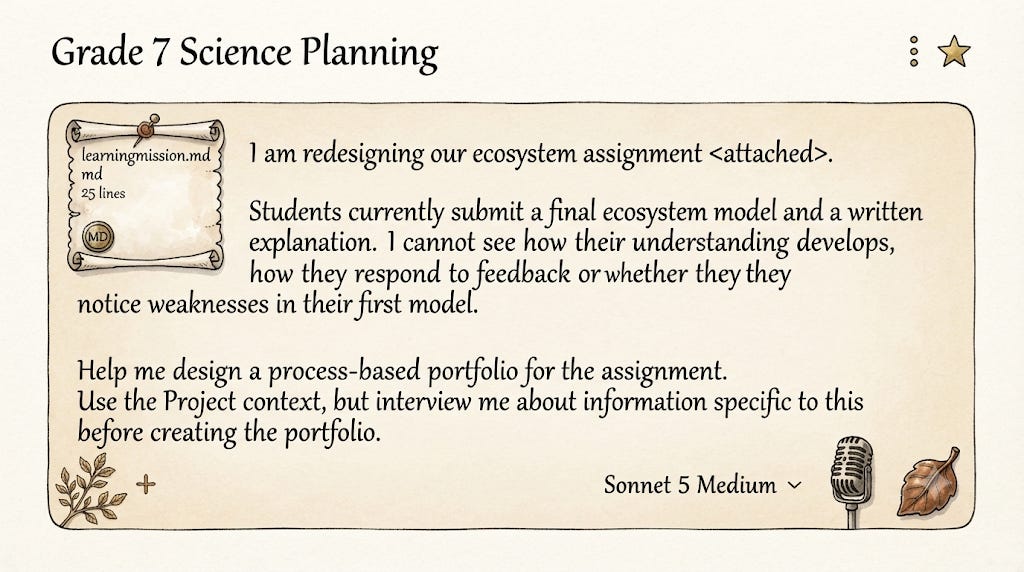
You could write:
I am redesigning our ecosystem assignment <attached>.

Students currently submit a final ecosystem model and a written explanation. I cannot see how their understanding develops, how they respond to feedback or whether they notice weaknesses in their first model.

Help me design a process-based portfolio for the assignment.

Use the Project context, but interview me about information specific to this assignment before creating the portfolio.
Step 3: Build the Process in a Normal Conversation
Do not create a Skill yet.
First, work out whether the process is any good. I often map processes / workflows in Notion, and then go and test a few different variations.
A Skill makes a process easier to repeat. It does not repair a process that was poorly designed in the first place.
Step 4: Turn the Process Into a Claude Skill
Once the process works, turn it into a Skill.
A Claude Skill is a reusable package containing instructions, reference material and sometimes scripts. It gives Claude a defined procedure to apply when a matching task appears.
A Skill is not memory.
The distinction is simple:
A Project contains context for an area of work.
A Skill contains a repeatable procedure.
A chat contains today’s specific task (it can have access to Project Memory if you use it within the project (that means the previous chats and other small things).
What Goes Inside a Skill
A custom Skill is built around a required file called:
SKILL.md
That file normally includes:
the Skill name;
a description of when it should be used;
required information;
the procedure Claude should follow;
boundaries;
quality checks;
expected output.
The Skill folder may also contain:
templates;
examples;
checklists;
reference files;
scripts;
testing notes.
Do not worry about manually writing all of this. Ask Claude to package the process you already developed.
Ask Claude to Create the Skill
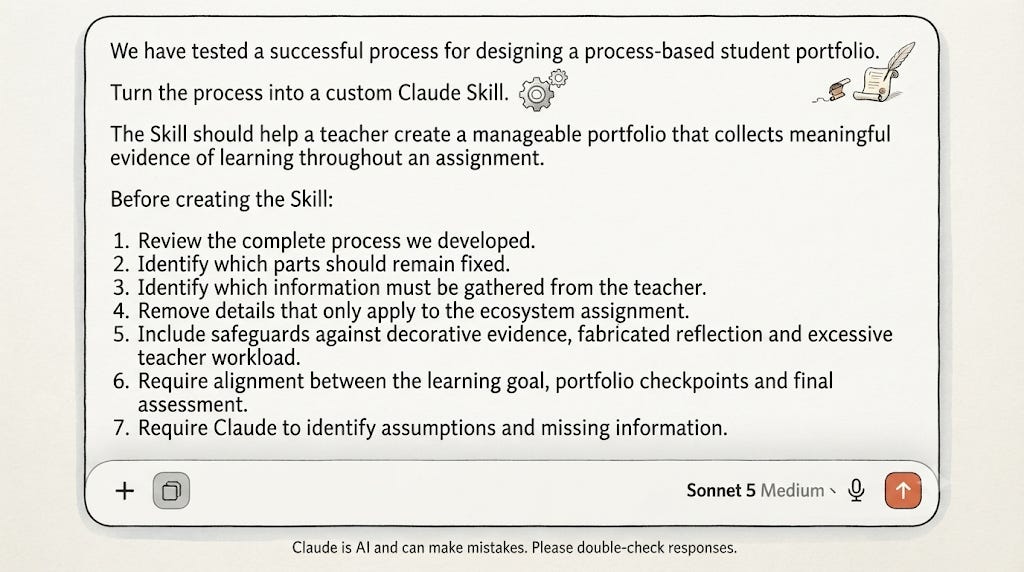
Continue in the same conversation where you designed and tested the portfolio.
Use:
We have tested a successful process for designing a process-based student portfolio.

Turn the process into a custom Claude Skill.

The Skill should help a teacher create a manageable portfolio that collects meaningful evidence of learning throughout an assignment.

Before creating the Skill:

1. Review the complete process we developed.
2. Identify which parts should remain fixed.
3. Identify which information must be gathered from the teacher.
4. Remove details that only apply to the ecosystem assignment.
5. Include safeguards against decorative evidence, fabricated reflection and excessive teacher workload.
6. Require alignment between the learning goal, portfolio checkpoints and final assessment.
7. Require Claude to identify assumptions and missing information.
8. Keep the Skill focused on this one repeatable process.

Create:

- the required SKILL.md file;
- useful reference files;
- a README explaining how to test it;
- three test prompts;
- a checklist for reviewing the output.

Package the files using the correct folder structure for a custom Claude Skill.
I then ask: create the skill.
A Simplified SKILL
The skill file could look something like this:
---
name: process-portfolio-builder
description: Designs manageable student portfolios that collect evidence of learning, decisions, feedback use, revision, verification and reflection during an assignment.
---

# Process Portfolio Builder

## Use This Skill When

Use this Skill when a teacher wants to:

- collect evidence throughout an assignment;
- make student thinking visible;
- design checkpoints around an existing task;
- reduce dependence on the final product;
- document how feedback or AI assistance was evaluated.

Do not use this Skill only to create:

- a decorative scrapbook;
- a generic reflection sheet;
- an AI-authorship detector;
- a second complete assessment;
- an activity log without evidence of thinking.

## Required Information

Before designing the portfolio, establish:

1. Year level
2. Subject
3. Learning goal
4. Final assignment
5. Duration
6. Major student decisions
7. Likely misconceptions
8. Available feedback points
9. Permitted AI use
10. Teacher workload constraints

Ask only for missing information that would materially change the design.

## Procedure

1. Restate the intended learning.
2. Identify evidence that would show progress.
3. Select four to eight meaningful checkpoints.
4. Define one bounded evidence item for each checkpoint.
5. Add a student explanation where interpretation is needed.
6. Include a feedback-decision checkpoint.
7. Include a substantive before-and-after revision.
8. Include verification when factual claims or sources are involved.
9. Include transfer-focused reflection.
10. Run the bypass test.
11. Run the teacher-workload check.
12. Produce teacher guidance and a student template.

## Quality Requirements

The portfolio must:

- align with the learning goal;
- show changes in student thinking;
- distinguish evidence from decoration;
- keep explanations concise;
- avoid collecting complete AI transcripts by default;
- include manageable teacher review points;
- avoid claiming to prove authorship;
- preserve appropriate productive struggle.

## Output

Produce:

1. Portfolio purpose
2. Assignment alignment
3. Checkpoint table
4. Student-facing instructions
5. Teacher implementation notes
6. AI-use expectations
7. Assessment options
8. Bypass risks
9. Workload check
10. Final quality review
This is different from saving one long prompt to reuse again and again.
The Skill includes the purpose, limits, required information, sequence, checks and output structure.
It can still produce bad work, of course. But at least the process is visible enough to inspect, and easy to rewrite.
Upload and Enable the Skill
Once you have a zip, you can upload it, sometimes it won’t work. Just go back to the skill chat and paste the error.
I often just copy and paste within write skill instructions for simple skills.
You can find skills go to customize on the left:
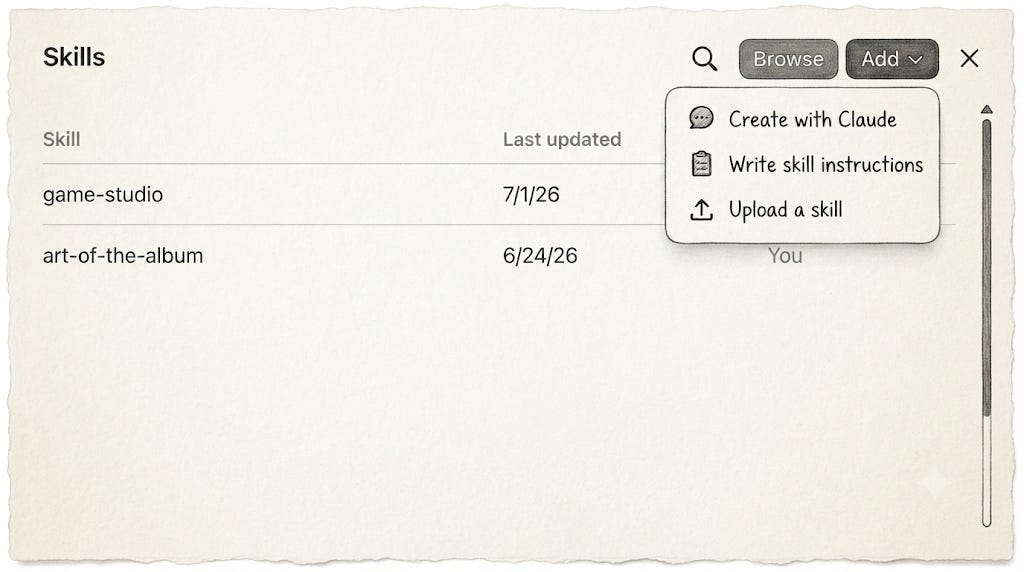
The rough process is:
Open Claude’s customisation area.
Open Skills.
Choose the option to add a Skill.
Upload the ZIP.
Enable it.
Test it in a new conversation.
The exact labels are less important than the sequence:
Build the process, document it, package it, test it, fix it.
Other Useful Skills Teachers Could Build
Once you understand the structure, you can use it for other repeated teaching jobs.
A curriculum-gap Skill could compare the intended curriculum, classroom activities and assessment evidence. It should work from supplied curriculum documents rather than inventing standards that sound convincing.
A productive-struggle Skill could check whether scaffolding or AI has removed the thinking students are meant to practise. Its main question would be:
Can students complete this task without using the intended skill?
A feedback-decision Skill could build routines where students accept, adapt, reject or investigate advice instead of treating feedback as an order.
A misconception-based planning Skill could begin with likely incorrect ideas and design a sequence that reveals and challenges them.
A retrieval-practice Skill could generate immediate recall, delayed recall, discrimination, cumulative review and transfer questions instead of producing ten versions of the same quiz item.
An accessibility Skill could simplify instructions, reduce unnecessary writing, provide visual support or break work into stages without quietly replacing the learning goal with an easier one.
An AI-boundary Skill could identify where AI is permitted, where disclosure is needed, where verification is required and where using AI would bypass the work.
A rubric-to-evidence Skill could check whether every criterion has something observable in the task. Rubrics often contain impressive language for things students never actually produce.
A lesson-sequence Skill could check whether modelling, guided practice, independent application, feedback and transfer appear somewhere across a unit. It should not force every element into every 45-minute lesson..
Free Claude Access Is Not the Main Point Here
The free educator offer makes Claude easier for teachers to access, and I am sure some teachers use other things.
Purposeful AI use begins when you make some of your professional context explicit, place it somewhere organised and turn a repeated teaching process into something that can be tested rather than re-prompted from scratch.
Start with steering.md.
Put it in one Project.
Develop one process.
When the process survives real use, turn it into one Skill.
Then keep checking the output because the system will still be wrong sometimes, and occasionally in ways that look annoyingly reasonable.
The basic structure is:
Context → Project → Process → Skill → Teacher review
Enjoy the journey!!
Phil
Please consider joining a yearly membership! I make it super cheap at $50usd for everyone, I already have over 100 incredible workflows, and each sign up allows me to dedicate time for another workflow!
If you pay and you don’t like the content, I will happily refund you!
Just to clarify. It is for teachers K-12 not university profs.